
For monitoring replication we know a lot of tools and codes – but this one is different because I wrote it 😉
Well this is fairly simple php code for monitoring a master master replication setup.
It requires a single shared login id available on both MySQL servers.
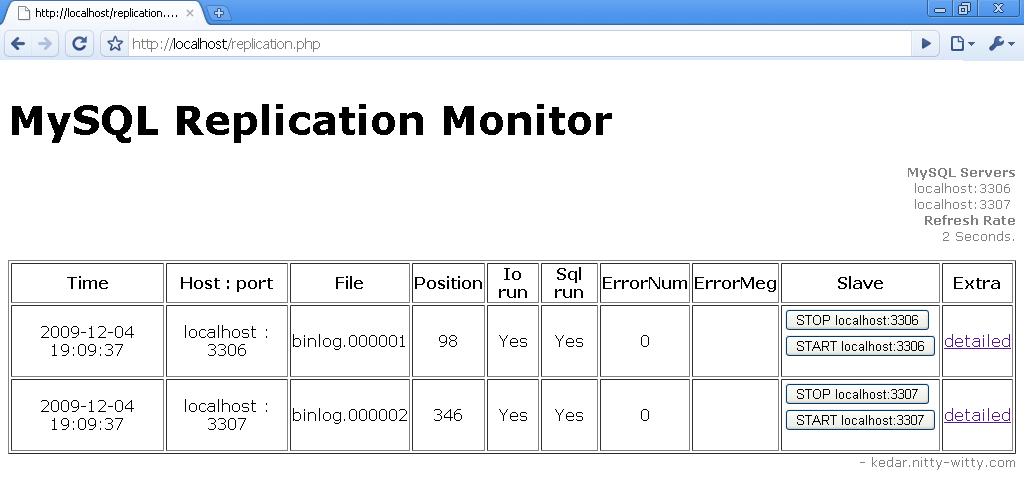
It will display in tabular format following details:
- File: Present binary log
- Position: Binary log position
- Io run: Slave IO Thread Running status
- Sql run: SQL Thread Running status
- ErrorNum: Error number
- ErrorMeg: Error message
You can easily stop / start each server’s slave (STOP SLAVE / START SLAVE) with a single click.
It also does provide detailed information of global status variables on same page.
It is auto refreshes by default every 2 seconds to provide updated status of both MySQL Servers in Replication.
In code you just need to adjust following parameters as per requirement:
#host-name & ports for replication servers
$slave = “localhost”;
$master = “localhost”;
$slaveport=3306;
$masterport=3307;
#Refresh rate
$refreshRate=2;
#considered a common username password for accessing both servers#
$username=”root”;
$password=”kedar”;
You can download code here: mysql-replication-monitor.php
MySQL Replication Monitor Using PHP:

8 comments
Ok. thx, Issue resolved.
Thx for the help kedar, we have our own alerting system, we are implementing this to monitor error , logs position & start / stop slave things handy, rather than giving server access to users.
I tried to install this script on our server but file , position , IO run , sql run , error number & error message fields are getting blank. i have mysql version 5.6.26 on centos .
Can you please help me to solve this ?
Sure Siddharth,
You need to make sure your credentials are correct and in place. You need to change following:
#host-name & ports for replication servers
$slave = “localhost”; # Provide IP / FQDN
$master = “localhost”;# Provide IP / FQDN
$slaveport=3306; # If both mysql are on different node then port should be default 3306 for both masters.
$masterport=3307;
#considered a common username password for accessing both servers#
$username=”user”;
$password=”xx”;
>> Make sure these credentials above works. Say you’re having the script on remote machine then you should be able to connect to both masters using this credentials.
Let me know.
Hi kedar,
Can i monitor master master replication with this script ?
Hi Siddharth,
This has been pretty old script and things have evolved. What’s importantly missing here is alert mechanism. You do not get alerted for any issues found unless you view the page.
If you want to use this, you better add a function to send-out email/msg.
That said, this only is limited to replication; there are other monitoring tool which monitors much more than just replication status and that is desired. Nagios with Percona monitoring plugins is one way to implement.
Hope this helps,
Kedar.
Hi, Thank you for this script
I am not able to download the mysql-replication-monitor.php, so please reload or provide direct link
thanks,
elavarasan
Hi mselavarasan,
Please check now. I’ve fixed it.
Cheers,
Kedar.