This procedure will split a “;” separated column in to new fields preserving ids.
This is very specific problem, lets check it with example.
Consider a sample table test:
And we want output as follows:
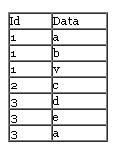
So again I wrote a procedure.
Procedure will read a data from “tmp” table and will split data by my_delimiter delimiter and generate a temporary table.
You may alter it as per requirement.
[ad#ad-2-300x250]
Download Stored Procedure : split_string
DELIMITER $$
DROP PROCEDURE IF EXISTS `split_string` $$
CREATE DEFINER=`root`@`localhost` PROCEDURE `split_string`()
BEGIN
DECLARE my_delimiter CHAR(1);
DECLARE split_string varchar(255);
DECLARE done INT;
DECLARE occurance INT;
DECLARE i INT;
DECLARE split_id INT;
DECLARE ins_query VARCHAR(500);
DECLARE splitter_cur CURSOR FOR
SELECT id,cat from tmp;
DECLARE CONTINUE HANDLER FOR NOT FOUND SET done=1;
DROP TEMPORARY TABLE IF EXISTS `my_splits`;
CREATE TEMPORARY TABLE `my_splits` (
`splitted_column` varchar(45) NOT NULL,
`id` int(10) default NULL
) ENGINE=MyISAM DEFAULT CHARSET=latin1;
OPEN splitter_cur;
splitter_loop:LOOP
FETCH splitter_cur INTO split_id,split_string;
SET my_delimiter=’;';
SET occurance=length(split_string)-length(replace(split_string,my_delimiter,”))+1;
IF done=1 THEN
LEAVE splitter_loop;
END IF;
# select occurance;
IF occurance > 0 then
#select occurance;
set i=1;
while i <= occurance do
# select concat(“SUBSTRING_INDEX(SUBSTRING_INDEX( ‘”,split_string ,”‘, ‘”,my_delimiter,”‘, “,i, “),’”,my_delimiter,”‘,-1);”);
SET ins_query=concat(“insert into my_splits(splitted_column,id) values(“, concat(“SUBSTRING_INDEX(SUBSTRING_INDEX( ‘”,split_string ,”‘, ‘”,my_delimiter,”‘, “,i, “),’”,my_delimiter,”‘,-1),”,split_id,”);”));
# select ins_query;
set @ins_query=ins_query;
PREPARE ins_query from @ins_query;
EXECUTE ins_query;
set i=i+1;
end while;
ELSE
set ins_query=concat(“insert into my_splits(splitted_column,id) values(“,split_string,”‘,”,split_id,”);”);
set @ins_query=ins_query;
PREPARE ins_query from @ins_query;
EXECUTE ins_query;
END IF;
set occurance=0;
END LOOP;
CLOSE splitter_cur;
END $$
DELIMITER ;
Usage: call split_string();
You might also like::


I would love to see the screenshots that you’re linking to in this post but the links are dead. Can you relink for me?
kedar.nitty-witty.com/blog/wp-content/uploads/2009/12/source-table.JPG
kedar.nitty-witty.com/blog/wp-content/uploads/2009/12/output-table.jpg
Thanks!
@Marc: Thanks for pointing that out.
Images are now fixed.
thank you very much for the tip. I’m using this technique on a project I will soon release as GPL, an opensource subscription manager for small magazines. your procedure is very useful in my project to build the delivery packing list, piking up the list of magazine numbers subscribed from a comma-separated list. I will credit your work as soon as it is ready. cheers! pierinux
thank you! these lines of code saved me a lot of work…
it’s a very useful piece of code .. thank u.. but atually i’m unable to call the procedure coz i get this error : #1312 – PROCEDURE can’t return a result set in the given context .. do u have any idea about the solution..
Heba,
I’m not sure how you’re using this, but this is very shallow example and not at-all generalized. You might need to update it as per your requirements.
Try below table definition:
CREATE TABLE `tmp` (
`id` int(11) DEFAULT NULL,
`cat` varchar(10) DEFAULT NULL
) ENGINE=MyISAM DEFAULT CHARSET=latin1;
insert into tmp values(1,’a;b;c’),(2,’d;e;f’),(3,’y;z’);
And run procedure from prompt or other way.
Let me know how you’re using this.
Kadar,
thanks for your reply.
actually i had tried a very simple statement like that insert statement and it worked fine.
but when i try the whole stored it gives me the mentioned error.
i tried to figure out which part of it that causes that error but i couldn’t cause it’s my first time with stored procedures with mysql and phpmyadmin.
========================================
||’Let me know how you’re using this.’||
========================================
i created the stored in phpmyadmin and then called it in phpmyadmin too. i’m trying to use the stored to split a string in one row in x table into multiple rows in y table.
If you google this you’ll find many of the times this has to do with older versions… Please check versions…
Also, Do make sure you make proper changes to SP as per your requirements.
May be you can share sample data on db4free.net to get it clear!
i figured out that EXECUTE command is the reason of my problem.. i removed it and worked around it.. it inserts successfully now..
i replaced this part :
//
SET ins_query=concat(“insert into my_splits(splitted_column,id) values(“, concat(“SUBSTRING_INDEX(SUBSTRING_INDEX( ‘”,split_string ,”‘, ‘”,my_delimiter,”‘, “,i, “),’”,my_delimiter,”‘,-1),”,split_id,”);”));
set @ins_query=ins_query;
PREPARE ins_query from @ins_query;
EXECUTE ins_query;
//
with this part
//
SET ins_query= SUBSTRING_INDEX(SUBSTRING_INDEX( split_string, my_delimiter, i),my_delimiter,-1);
set @ins_query=ins_query;
insert into my_splits values(@ins_query,split_id);
//
thanks
happy to help
actually i reached this solution out by luck :s
i tried removing lines one by one untill it worked… then i realized that execute command is the reason of the problem..
but seems like u have a proof of that and have more information about it.. u can tell me any info if u dont mind.. i’m starting with stored procedures these days..
thanks in advance
:)
and many thanks to the author Kedar
Hi Thanks it works.
Now, I had to use _space_ as delimiter, something that did not work very well with the above.
But doing a replace ” ” -> “;” on the select fixes that.
SELECT id,REPLACE(cat, ‘ ‘, ‘;’) from tmp;
This just saved me tons of time. Thanks!!
I really like this post. This really saves lots of time.
Thanks a lot for the procedure, extremely useful. I have a little problem and I would like to ask you for help: when I run it on one of my table I get this error ” Error Code: 1064
You have an error in your SQL syntax; check the manual that corresponds to your MySQL server version for the right syntax to use near ‘NULL’ at line 1″
And I am really not able to figure out what could it be due to. I get some result in the table “my_splits” (removed the tempoary). I also tried to set both `splitted_column` and ‘id’ to “default NULL”, but I continue to get that error. Any idea? Thank you very much.
Hey MIchael,
I’d like to know your exact scenario!
Meanwhile make sure you’re not copying procedure from page but downloading it from the link.
Once procedure get loaded into db, you may uncomment some of the lines to debug through!
Cheers,
Kedar
Thanks guys, this code worked great.
but i have 11,00,000 records to split, i feel its better to do in batches. Please help me to do it
Sneha,
I think you can do that using LIMIT for splitter_cur cursor.
Eg. process 10000 records as:
DECLARE splitter_cur CURSOR FOR
SELECT id,cat from tmp limit 10000;
Hope this helps,
Kedar.
Hi There,
I need a little help handling TLV’s.
I have a TLV which contains around 20 tags and i need to split that tlv in groups of 9.
So for example if the TLV has 20 tags then it should got broken into 9 + 9 + 2 tags.
Using Nested loops will work but i am finding hard to implement it in PL SQL.
have anyone encountered the same problem or have some relevent procedure, Do mail me @ amazing.ankit@gmail.com
Thanks !
Thanks a bunch! With some minor tweaking I got it working for my application. Here are some things I found out:
To change the character used for delimiting you need to change 2 areas, I changed the characters to ! exclamations to make it easier to see:
line 30:
SET occurance=length(split_string)-length(replace(split_string,'!',''))+1;line 31:
SET my_delimiter='!';To run the procedure:
CALL split_string();This will put the data in a temporary table named “my_splits” with fields ‘id’ and ‘splitted_column’, make sure you use that data before the temporary table is gone.
Here is the sample “tmp” table (thank previous poster):
CREATE TABLE `tmp` (
`id` int(11) DEFAULT NULL,
`cat` varchar(10) DEFAULT NULL
) ENGINE=MyISAM DEFAULT CHARSET=latin1;
insert into tmp values(1,'a;b;c'),(2,'d;e;f'),(3,'y;z');
You may need to change line 4 for your webserver config
CREATE DEFINER=`root`@`localhost` PROCEDURE `split_string`()Glad to know Alex…